
Streamlining Banking & Financial Systems Integration for a Growing Biotechnology Firm

Disclaimer: it wasn’t actually “broken”, just…mismanaged.

Background

Our client is a growing biotechnology companyoperating across multiple subsidiaries, including a U.S. headquarters entity and an Australian subsidiary.

As the organization scaled its financial operations, it sought to modernize its accounts payable and payment processes by integrating Oracle NetSuite with JP Morgan Treasury Ignition through the FiSpan plugin a powerful but complex banking integration requiring precise configuration across permissions, workflows, and chart of accounts.

Industry: Biotechnology / Life Sciences Platform: Oracle NetSuite / OneWorld (Multi-Subsidiary) Banking Integration: JP Morgan Treasury Ignition via FiSpan Plugin Engagement Type: Semi-Rescue, Ongoing NetSuite Functional Support & Systems Integration

Challenges
1. Vendor Credit / Bill Credit Not Flowing Through the JPM Plugin

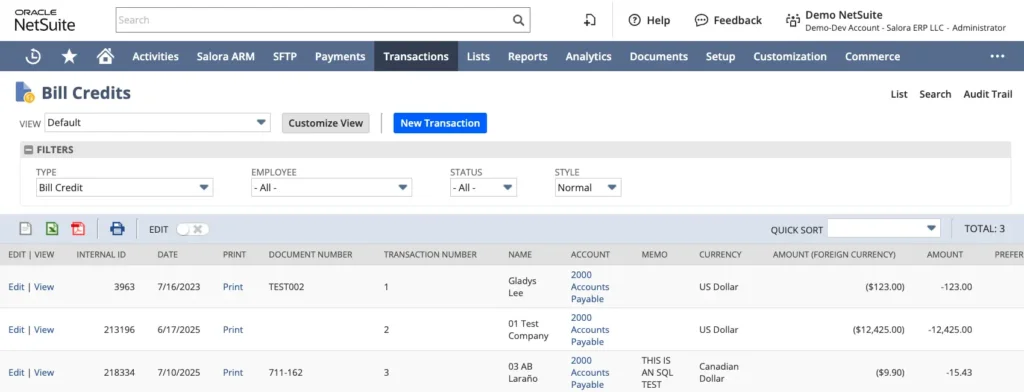
The client’s AP team discovered that while vendor invoices processed successfully through the JP Morgan Plugin, bill credits were being dropped during payment runs. When selecting invoices and an associated bill credit for batch payment processing, the credit would not be applied or picked up — both in native NetSuite and through the JPM Plugin. This left open credits unapplied against vendor balances and caused reconciliation discrepancies.

A specific example involved a key vendor where a bill credit exceeding $54,000 was consistently unavailable for selection during payment processing, despite invoices totaling over $217,000 being queued for payment.

2. Accounts Payable Account Hierarchy Mismatch in JPM Plugin

The root cause of the bill credit visibility issue was traced to a child account naming hierarchy in NetSuite that was not surfacing correctly in the JPM Plugin’s dropdown. NetSuite’s Chart of Accounts included:

  • Account 2000 – Accounts Payable (parent)
  • Account 2005 – Accounts Payable: Accounts Payable (child)

While NetSuite displayed these as a single logical account, the FiSpan/JPM Plugin rendered them as duplicate entries in its A/P account selector. When the incorrect account was selected, the system returned “No Credits Available” — even though credits existed under the correct account — blocking vendor credit application entirely.

3. FiSpan Plugin Permissions & Script Deployment Misconfiguration

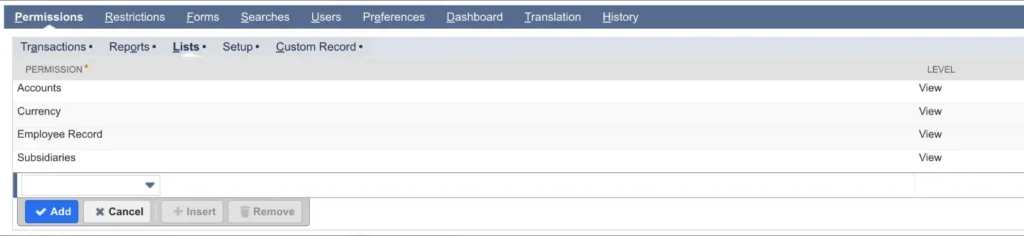
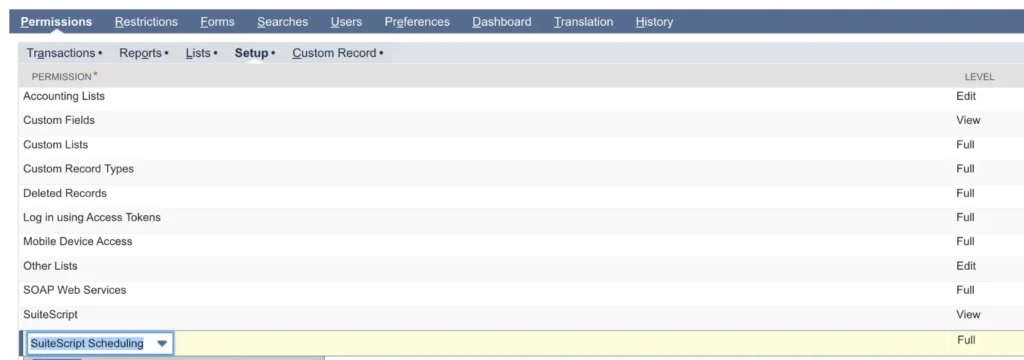
An audit of the FiSpan plugin setup revealed that custom roles used by AP and finance staff lacked several required permissions as specified by FiSpan’s configuration guide.

Additionally, all SuiteScripts powering the plugin were set to “Execute as Role: Current User” rather than “Administrator”, causing inconsistent behavior and intermittent errors depending on which user was logged in.

4. Bill Approval Workflow – Transactions Stuck in “Pending Approval”

The client’s VP of Finance flagged a critical issue where a high-value vendor bill (exceeding the $500,000 CEO approval threshold) was stuck in “Pending Approval” status even after the required board approval document was attached and the controller approved the transaction. This was the first time the issue had occurred and was blocking a significant payment obligation.

5. A/R Module – Unable to Save Invoices for Australian Subsidiary

When the client’s Senior Staff Accountant attempted to create the first customer invoice for the Australian subsidiary, the system threw an error: “Please select an A/R account for this invoice.” The Accounting tab’s A/R account dropdown was blank, with no selectable options.


Solutions Delivered
Vendor Credit & JPM Plugin Fix

Working in close coordination with JP Morgan Treasury Ignition™ support (FiSpan) and escalating to their Tier 2 team, Salora ERP identified that the JPM bundle required an updateto support credit transactions.

Article content

Once the bundle was updated, vendor credits became visible and selectable in the payment interface. Salora ERP also submitted and managed the FiSpan/plugin support case on the client’s behalf to ensure timely resolution, including escalating directly for priority handling.

A/P Account Hierarchy Remediation

Article content

Salora ERP documented the NetSuite account hierarchy and confirmed that Accounts 2005 and “2005 Accounts Payable: Accounts Payable” were one and the same account, with the child naming convention simply not rendering correctly in the JPM Plugin’s UI. Guidance was provided on correct A/P account selection within the plugin to ensure bill credits surfaced accurately, and the configuration was validated through sandbox testing.

FiSpan Plugin Permission Hardening

A comprehensive audit of all custom roles was completed. All roles were confirmed to have the minimum required permissions per FiSpan’s official configuration guide, including:

Article content

Additionally, all relevant SuiteScripts were updated to “Execute as Role: Administrator” to eliminate user-dependent inconsistencies and prevent future errors.

Salora ERP also configured and validated the following saved searches for ongoing operational visibility:

  • Vendors with Payment Method of ACH or Wire but without Entity Bank Details
  • Vendors with Entity Bank Details but without JPM Payment Method
  • Entity Bank Details List (Employees)
  • Entity Bank Details List (Vendors)

Bill Approval Workflow Resolution

Salora ERP analyzed the approval workflow configuration in production and identified a misconfiguration causing high-value transactions to remain locked in pending status. The workflow context was corrected to ensure the approval state advanced properly upon administrator action, unblocking the payment and restoring the authorization flow.

Australian Subsidiary A/R Account Fix

Through collaboration with NetSuite support, Salora ERP identified that the existing “Accounts Receivable – Trade” account did not include the Australian subsidiary in its subsidiary settings, and — critically — the “Eliminate Intercompany Transactions” flag could not be enabled on an account with existing posted transactions.

The solution required creating a new A/R account with the following properties:

  • Name: Accounts Receivable – Intercompany
  • Type: Accounts Receivable
  • Eliminate Intercompany Transactions: ✓ Enabled
  • Subsidiaries: Parent Company (U.S. Entity), Include Children: ✓

This new account was validated in NetSuite’s internal QA environment before implementation, confirming that invoices for the Australian subsidiary could be saved without errors.


Post a Comment