
If you’re still running SuiteTalk SOAP in 2026, I’m not here to shame you. A lot of solid integrations were built on SOAP and they’ve been quietly doing their job for years, your iPaaS connector, your EDI flow, Shopify or Amazon order sync, 3PL and WMS handshakes, tax engines, payment gateways, even that nightly data warehouse push nobody wants to touch.
If SOAP is still in your stack, consider this your friendly nudge to start planning the exit. NetSuite has put real milestones in writing, including the final removal release.
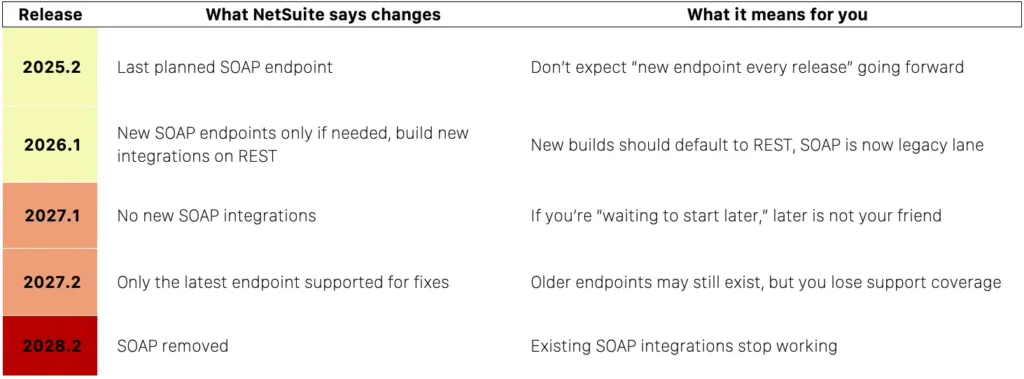
Pin this cheat sheet first
Quick migration checklist
- ⬜ Inventory every SOAP integration and rank by business risk
- ⬜ Confirm which SOAP endpoint version you’re using
- ⬜ Pick your target pattern: REST records, REST plus SuiteQL, RESTlets for gaps
- ⬜ Lock authentication (OAuth 2.0 or TBA) and least-privilege roles
- ⬜ Build a parallel-run harness to compare SOAP vs REST outputs
- ⬜ Cut over in phases, not all at once
- ⬜ Retire SOAP jobs and document the new path
Untangling deprecated vs removed
SOAP isn’t “gone” in 2025.2 or 2026.1. SOAP is scheduled to be removed in 2028.2.
So why does everyone sound like it already died?
Because NetSuite made two different moves that people lump together as “deprecation”:
- Release policy change: starting 2026.1, NetSuite says it will stop shipping a new SOAP endpoint every release and only publish a new endpoint when required. This is why 2025.2 is described as the last planned endpoint.
- Build guidance and restrictions: NetSuite’s own FAQ says new integrations should be built using REST starting 2026.1, and that by 2027.1 it will no longer be possible to build new SOAP integrations.
- Final removal: the same FAQ and the SOAP overview docs point to 2028.2 as the release where SOAP is no longer available and existing integrations stop working.
That’s the whole story.
The replacement: SuiteTalk REST
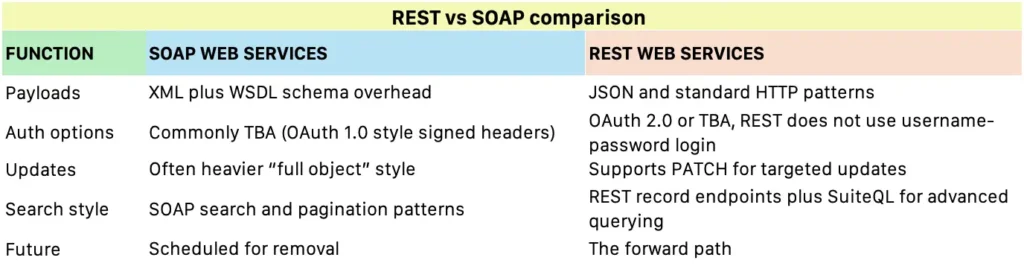
SuiteTalk REST Web Services is NetSuite’s more modern integration lane: JSON payloads, standard HTTP semantics, and a record-first API that plays nicer with today’s tooling and integration platforms.
The biggest, most impactful upgrade for most teams is this:
You can run SuiteQL through REST. If your SOAP integration leans heavily on searches, pagination, and “searchMoreWithId forever,” SuiteQL over REST can turn a lot of those pulls into cleaner, more direct queries that are easier to reason about and optimize.
REST also brings two very practical quality-of-life wins:
- OAuth 2.0 is available for REST and RESTlets, and SOAP does not support OAuth 2.0. That matters for security posture and for modern platform compatibility.
- Partial updates using PATCH. You can update only what changed instead of resending large payloads, which reduces risk and noise during maintenance.
How to migrate from SOAP to REST safely and efficiently
This is the part that matters: how to switch without breaking month-end, order flows, or settlements.
Step 1: Build a SOAP inventory that’s actually useful
Don’t start with code. Start with clarity.
For each SOAP integration, capture:
- records touched and operations performed
- frequency and timing (real-time, hourly, nightly)
- endpoint version in use (for example, 2025.2)
- authentication method and integration user role
- business impact if it fails
Then rank them. “Payroll stops” goes first. “Nice-to-have dashboard sync” goes later.
Step 2: Pick the right REST migration pattern
Most SOAP migrations land in one of these lanes
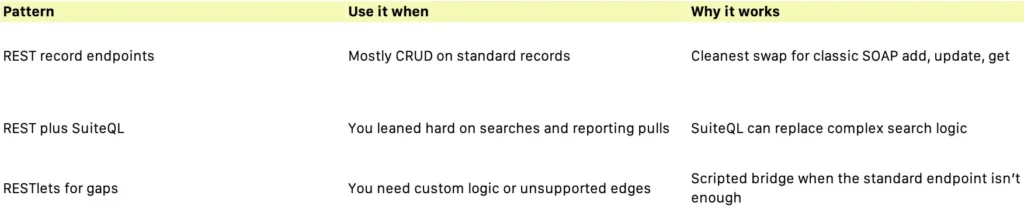
You can mix patterns per workflow. The goal is stability and maintainability, not purity.
Step 3: Lock authentication early and keep it boring
If you’re modernizing, strongly consider OAuth 2.0 for REST and RESTlets, since it’s explicitly positioned there and SOAP can’t use it. Whichever you choose, enforce:
- least-privilege roles
- separate credentials per environment (sandbox, Release Preview, production)
- rotation and auditability
Step 4: Map SOAP operations to REST equivalents
Most SOAP integrations collapse into a few primitives:
- get and getList → REST GET
- add and addList → REST POST
- update and upsert → REST PATCH or PUT depending on record behavior
- search and searchMoreWithId → REST query strategy, often SuiteQL for complex pulls
Where teams get surprised:
- internal IDs vs script IDs mapping
- subrecords and sublists behaving differently
- timing differences, especially when you write then immediately query
Step 5: Do a parallel run before you cut anything over
This is the single best way to avoid ugly surprises.
Keep SOAP as the “writer” for a short period, and run REST in shadow mode:
- mirror the same calls
- compare record IDs, totals, statuses, and counts
- log deltas by category (mapping, permissions, timing, rounding)
Then cut over workflow by workflow behind a feature flag.
Step 6: Make your integration replay-safe
Retries happen. Timeouts happen. Vendor APIs get weird.
So you want idempotency in your integration layer:
- store a stable external reference on the NetSuite record when possible
- design “retry” so it does not create duplicates
- use backoff and a dead-letter queue or exception list for manual review
Step 7: Test like you mean it
Before go-live, simulate:
- month-end close volume
- promo spikes and high order throughput
- settlement and payout batch days
- concurrent runs
If you rely on queries right after writes, measure time-to-consistency and adjust sequencing.
Step 8: Cut over, monitor, retire
A clean cutover looks like:
- a short freeze window for risky workflows
- deploy REST integration
- monitor error rates, throughput, and exception queues
- keep rollback simple, even if it means temporarily flipping back to SOAP
Once a workflow has survived at least one full business cycle, retire SOAP intentionally:
- disable SOAP schedules
- archive WSDL and endpoint configs
- update docs so nobody “accidentally” rebuilds SOAP because it still works
Want a safe SOAP exit plan? Salora ERP can run a quick integration audit, build a migration roadmap, and support the REST rollout (including parallel-run testing and cutover).
Reach us at [email protected] or (+1) 720-254-1320.

